
All three read Japanese text from your camera or a photo, but they answer different questions. Google Lens and Google Translate are Japanese camera translators: they answer "what does this say in English?". Furigana Reader answers "how do I read this, and what does each word mean?". If you live in Japan or are learning the language, you will probably want both kinds.
The short answer
| When | Use |
|---|---|
| You need the gist of a long letter, notice or document, now | Google Lens or Google Translate |
| You want to know how to say the kanji (furigana, romaji) | Furigana Reader |
| You want the meaning of each word, not just the sentence | Furigana Reader |
| You want to save the words and review them later, or take them to Anki | Furigana Reader |
| You are learning and want a natural translation with grammar notes | AI Explain in Furigana Reader (Plus and Pro) |
| You are talking with someone | Google Translate's conversation mode |
| You have no connection | Furigana Reader reads on the phone. Google Translate also works offline once you download Japanese. |
What Google Lens and Google Translate do well
- They are free, and work on iPhone and Android.
- They translate a whole page at once and lay the English over the photo or the live camera view.
- They handle long text well: letters, forms, instructions, a full menu.
- They translate into many languages, not only English.
For a tourist who just needs to know what a notice says, that is often all you need.
Can Google Lens show furigana?
Not over each kanji. The camera views of Google Lens and Google Translate show a translation, so you learn what a sign means but not how to read it. For a learner, a few more things are missing:
- A sentence translation hides which word means what, so it is hard to learn the words from it.
- The words don't become flashcards with spaced review, and you can't export them to Anki with the photo.
What Furigana Reader does
- Reads the photo on your phone, with Apple's on-device Japanese OCR (Live Text): fast, private, and it works offline. A photo is only sent anywhere when you tap AI Explain on it.
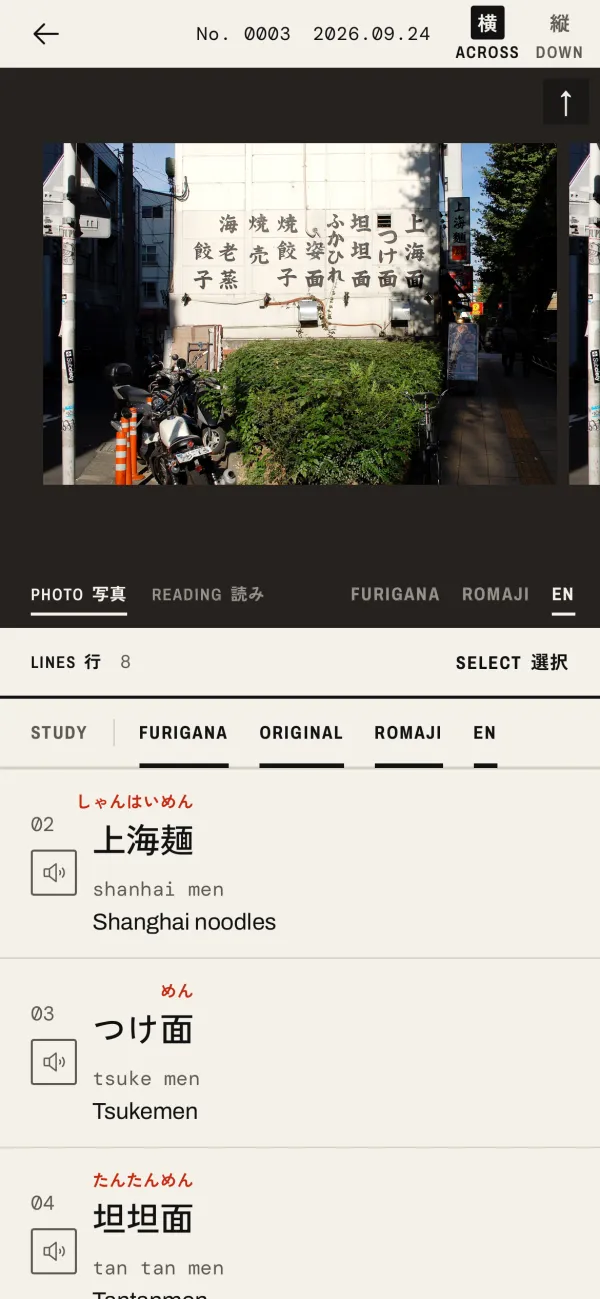
- Puts furigana over every kanji, with romaji and the English meaning of each word, and reads lines aloud.
- Lays furigana, romaji or English on the photo itself, on the READING page.
- Saves words to folders, reviews them with flashcards, filters them by JLPT level and exports them to Anki with pictures.
- On Plus and Pro, AI Explain adds a natural translation, the meanings in context and grammar notes.
When another tool is better
For long documents, Google Lens or Google Translate is the better tool. Furigana Reader's on-phone meanings are dictionary meanings, one word at a time, which is great for learning words and slow for reading a two-page letter. AI Explain gives a natural translation, but it is meant for a sign or a menu, not a contract. It is not available in the EEA, the UK and Switzerland, and Furigana Reader is only on the App Store: there is no Android version.
Free or paid
Google Lens and Google Translate are free. Furigana Reader is free to start, with 3 scans a day and 3 more for each short ad, up to 18. Plus ($3.99 a month) gives 50 scans and 15 AI Explains a day. Pro ($9.99 a month) gives unlimited scans, 50 AI Explains a day, 10 photos at once and cloud sync. See plans.
Use both
Many learners keep both on their phone: a translator for the gist of a long notice, and Furigana Reader for the signs and menus they want to learn to read. Start with how to read signs and menus.