
You can read hiragana and katakana. Then you step off the train, the sign says 出口 (deguchi, exit), and the menu is mostly kanji. This guide shows how to read Japanese signs and menus with your phone, one word at a time: the Japanese you need for travel in Japan, and a start on reading it yourself.
Why kanji is the hard part
Japanese mixes three scripts. Hiragana and katakana are sounds, so a beginner can sound them out, even on a menu: サーモン is sāmon, salmon. Kanji carry meaning, and most have more than one reading. 出口 (deguchi, exit) is two kanji you can't sound out until you have learned them.
Textbooks solve this with furigana, small kana printed over each kanji. Signs and menus almost never have it. So the trick is to add it yourself, from a photo. (New to the word? See what furigana is.)
Step by step: look up the kanji with your camera
- Open Furigana Reader on Scan and point the camera at the sign or the menu, or choose a photo or a screenshot. If there is a lot of other text, crop the photo to the part you need.
- Tap Scan. The photo is read on your phone, so it takes a moment and works without a connection.
- Read each line: furigana over the kanji, romaji under it, and the English meaning of every word. Tap the speaker to hear the line read aloud.
- Swipe the photo to READING. Furigana, romaji or English are laid on the photo, next to each line, so you can see which line on the menu is which dish.
- Tap any word to see its meaning, part of speech and JLPT level, and save it for later.
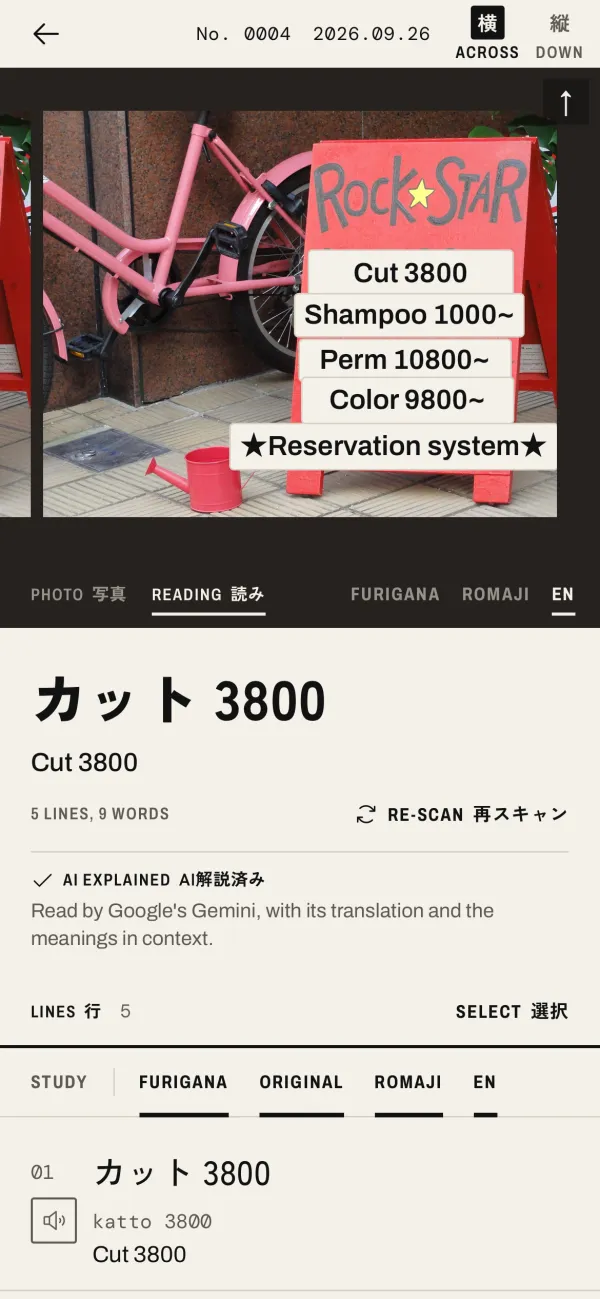
How to read a Japanese menu
The price board above, outside a hair salon in Kyoto, reads like a menu. On the photo you see the English on each line: カット (katto, cut), シャンプー (shanpū, shampoo), パーマ (pāma, perm) and カラー (karā, colour), each with its price in yen, and 予約制 (yoyakusei) at the foot: by reservation only.
- Take the photo straight on, in good light, and close enough that the text is sharp.
- Vertical menus are read too. Handwriting is harder: if a line comes out wrong, take the photo again, closer.
- On a long menu, crop to one section at a time. The lines are easier to follow.
How to read Japanese station and shop signs
Station signs often have romaji or English as well, but the kanji is what matches your map and the voice on the train, so it is worth reading. Shop signs tell you if a place is open (営業中) or getting ready (準備中). Warning signs have whole sentences: you get the meaning of each word, which is usually enough to know what the sign is about.
15 words you will see again and again
| Japanese | Reading | English |
|---|---|---|
| 出口 | でぐち deguchi | exit |
| 入口 | いりぐち iriguchi | entrance |
| 駅 | えき eki | station |
| 切符 | きっぷ kippu | ticket |
| お手洗い | おてあらい otearai | restroom |
| 禁煙 | きんえん kin'en | no smoking |
| 営業中 | えいぎょうちゅう eigyōchū | open (for business) |
| 準備中 | じゅんびちゅう junbichū | getting ready (closed for now) |
| 注文 | ちゅうもん chūmon | order |
| 予約 | よやく yoyaku | reservation |
| 無料 | むりょう muryō | free of charge |
| 税込 | ぜいこみ zeikomi | tax included |
| 押す | おす osu | push |
| 引く | ひく hiku | pull |
| 注意 | ちゅうい chūi | caution |
When another tool is better
Furigana Reader gives you the reading and the meaning of each word. On its own it does not turn a long notice or a whole menu into natural English: the meanings read on the phone are dictionary meanings, one word at a time, and names of places or dishes can come out literally. The place name 大森 (Ōmori), for example, shows as "large forest".
If you only need the gist of a long text, or want a Japanese menu translator for the whole menu at once, Google Lens or the camera in Google Translate gives a full translation over the photo, for free. They are also the quickest way to translate a Japanese sign in full. On Plus and Pro, AI Explain gives a natural translation of a scan, with the meanings in context and grammar notes; it is not available in the EEA, the UK and Switzerland. See Furigana Reader vs Google Lens and Google Translate.
Make the words stick
The words you meet on a trip are the easiest ones to remember, because you saw them in a real place. Save them as you go, review them with flashcards for a few minutes a day, and send them to Anki if you use it: learn the words you meet in Japan.