
Furigana (振り仮名) are small kana printed next to kanji to show how to read them. In horizontal text they sit above the kanji; in vertical text, to the right. If you can read hiragana, furigana lets you read kanji you have never learned.
注文
chūmon: order. The kanji are 注文; the furigana above them, ちゅうもん, tell you how to say them.
Where you see furigana
Children's books, textbooks and many manga print furigana over every kanji. Newspapers and books for adults use it only for rare kanji and for names. Signs, menus and websites almost never have it. That is why a beginner can read a manga for young readers but not a station sign.
Furigana or romaji: which should a beginner use?
Romaji writes Japanese in Latin letters: 注文 is chūmon. It is easy on day one, but you can't find romaji on a real sign. Furigana keeps your eyes on Japanese script, and every time you read it you practise kana. Most learners start with both and drop romaji once kana is easy.
Furigana Reader shows furigana, romaji and English together, and you can turn each one off. STUDY hides the readings until you tap a line, so you can test yourself.
How to add furigana to a photo or a screenshot
- Take a photo of the text, or a screenshot of it. On iPhone, press the side button and the volume up button together for a screenshot.
- In Furigana Reader, choose the photos on Scan: up to 3 at once, or 10 on Pro. Crop or rotate one first if you need to.
- Tap Scan. Each line comes back with furigana over every kanji, the romaji, and the English meaning of each word. It is read on your phone, so it also works offline.
- Swipe the photo to READING to see the furigana laid on the photo itself, next to each line.
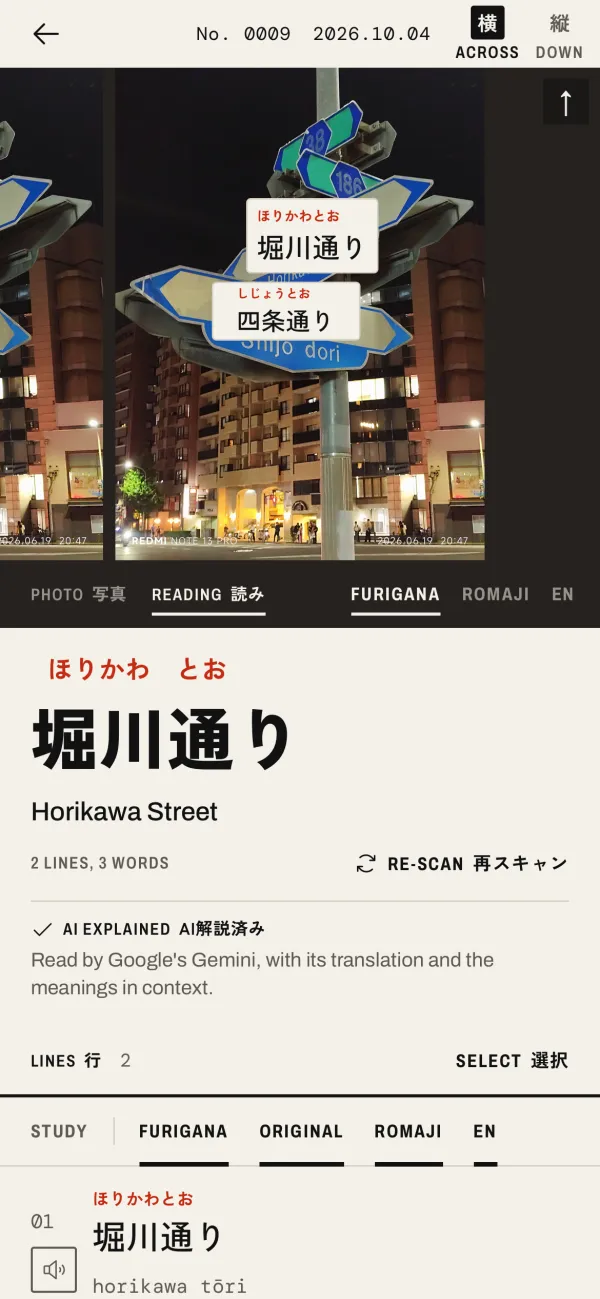
This works for anything you can photograph or capture: a sign, a menu, a page of a book, a game, an app, or a message from a friend. Your photos are read on the phone and are not uploaded, unless you tap AI Explain on one.
Furigana from a photo, as romaji
If you are not yet reading kana, switch the photo to ROMAJI on the READING page. Each line on the photo shows its romaji instead, so the app works as a romaji converter for photos. Switch back to FURIGANA as you get faster.
How accurate are the readings?
Many kanji have more than one reading, and the right one depends on the word. The app picks the reading from its dictionary (JMdict), word by word. For common words it is usually right. Names of people and places are the hardest: 四条通 is Shijō-dōri, a street in Kyoto, but a dictionary can read 通 as tsū. When a sign gives its own romaji, trust the sign.
When another tool is better
If the Japanese is text you can select, on a web page or in a document, you don't need a photo: a browser extension that adds furigana, or an online furigana converter you paste the text into, is quicker. For a long book, an e-book reader with a built-in Japanese dictionary is easier than taking photos. Furigana Reader is best for text that only exists as a picture: signs, menus, printed pages and screenshots.
Next steps
Once you can read a word, keep it: save the words you meet and review them with flashcards. Or start with the places you need it most: reading signs and menus.